[ Tutorials ]
How to Build a Landing Page That Converts: A Step-by-Step Guide
A landing page has one job: turn a visitor into the next step. Here is how to structure it, write it, and actually test whether it works, instead of guessing.
On this page
- TL;DR: the structure of a page that converts
- Start above the fold: promise, proof, action
- Write copy that survives a five-second scan
- Make the action obvious, and make it easy
- Add proof where the doubt shows up
- How to know it actually converts (test, do not guess)
- Common landing page mistakes to avoid
- Ship it, then keep making it better
- Frequently Asked Questions
A landing page has exactly one job: turn a visitor into the next step, a sign-up, a trial, a sale. The hard part is that you cannot tell whether it is doing that job just by looking at it. A page can be beautiful, perfectly aligned, and still convert almost nobody.
This is a build-it-today guide, not a theory lecture. It walks through the anatomy of a landing page that converts: the above-the-fold promise, copy that survives a five-second scan, calls to action that get out of the way, proof that feels real, and the one habit that separates pages that improve from pages that just sit there.
TL;DR: the structure of a page that converts
If you remember nothing else, remember this: a landing page is a single, focused argument for one action. Every section either moves the visitor toward that action or it is in the way. Most pages that fail are not ugly, they are unfocused.
- One promise, above the fold: who it is for, what they get, and what to do next, all visible before anyone scrolls.
- Copy built for scanning: benefit-led headings and short blocks, not walls of text.
- One primary action: a single, obvious call to action, repeated, with as little friction as possible.
- Proof next to the decision: real social proof and trust signals right where doubt creeps in.
- A way to see what actually happens: because you cannot improve a page you are not watching.
Start above the fold: promise, proof, action
The first screen decides whether anyone reads the second. A visitor lands, glances, and within a few seconds silently asks three questions: am I in the right place, what is in it for me, and what do I do next. If the top of your page does not answer all three, the rest of it rarely gets a chance.
So lead with a headline that names the outcome, not the mechanism. 'Ship your site this weekend' beats 'A powerful website builder'. Add a subhead that says who it is for and answers the most obvious objection in one line. Put one clear call to action in view immediately, and back it with a sliver of proof: a recognizable logo, a number you can stand behind, or a single strong line from a real customer.
Resist the urge to explain everything up here. The job of the first screen is not to close the sale. It is to earn the scroll.
- Headline: the outcome in plain words, the thing they walk away with.
- Subhead: who it is for, with the main objection answered in one line.
- Primary CTA: one action, visible without scrolling, phrased as a benefit.
- A sliver of proof: one logo, one real number, or one short quote. Not a wall.
Write copy that survives a five-second scan
Almost nobody reads a landing page word for word. They scan: headline, subheads, the bold bits, buttons, captions. If the scan alone does not make sense, the page has failed for most of your visitors, no matter how good the full paragraphs are.
So write for the scan first. Make every heading a complete thought, so a visitor who reads only the headings still gets the whole argument. Lead with the benefit (what changes for them), then support it with the feature (how you do it). Cut hedging words, cut the throat-clearing intro sentence, and cut anything that does not earn its place.
Here is a quick test: read only your headings and buttons out loud, in order. Do they tell a coherent story that ends in the action you want? If not, fix that skeleton before you polish a single paragraph.
- Headings carry the argument: each one a complete, benefit-led thought.
- Benefits before features: what they get first, how it works second.
- Short blocks: a few lines each, with whitespace the eye can rest in.
- Concrete over clever: specifics persuade, clever lines get skimmed.
Make the action obvious, and make it easy
Once someone wants what you are offering, your only job is to not get in the way. This is where a surprising amount of conversion quietly dies: in forms that ask for too much and buttons that hide or hedge.
Pick one primary action per page and repeat it down the page. Do not scatter five competing buttons that each pull in a different direction. Phrase the button as the value the visitor gets ('Start free', 'Get my report'), not the work they have to do ('Submit'). Then strip the form to the fewest fields you genuinely need right now. Every extra field is another reason to leave, and you can always ask for more later, once there is a relationship.
Reduce the friction around the click, too. Say what happens next, reassure on the scary parts (no credit card, cancel anytime, takes two minutes), and never make someone hunt for the button.
- One primary action, repeated down the page, not five competing ones.
- Benefit-led button copy: 'Start free' over 'Submit'.
- Fewer form fields: ask only for what this step truly needs.
- Remove the small fears: say what happens after the click, in plain words.
Add proof where the doubt shows up
People look to other people when they are unsure. Social proof works because it lends a hesitant visitor some trust you have not personally earned from them yet. But it only works if it feels real.
Put proof next to the decision, right beside the call to action and right where a reasonable person would pause. Specific beats generic every time: a concrete result, a named customer, a real screenshot, a number you can defend. Vague badges and walls of invented five-star reviews do the opposite of what you want, because a careful reader discounts them on sight and starts to wonder what else is exaggerated.
If you are early and do not have logos yet, that is fine. Use what is true: a clear guarantee, a transparent how-it-works, a founder's note, a real demo. Honesty is itself a trust signal, and it is one you can offer on day one.
- Specific over generic: one real result or quote beats a row of stars.
- Proof near the action: place it where the doubt actually appears.
- Only what is true: never invent numbers or testimonials, it backfires.
- Early-stage proof counts: guarantees, demos, and plain transparency build trust too.
How to know it actually converts (test, do not guess)
Here is the uncomfortable part. Everything above is a set of good defaults, not guarantees. Two reasonable people will disagree about your headline, and both will sound convincing. The only way to actually know which version of a page converts better is to watch real visitors use it.
Design opinions are cheap. Behavior is the truth. You want to see where attention dies on the page, which sections people never reach, where they click on something that is not a link, and exactly which step of the sign-up they abandon. You cannot fix a drop-off you cannot see, and you will never spot it buried in a pile of pageviews.
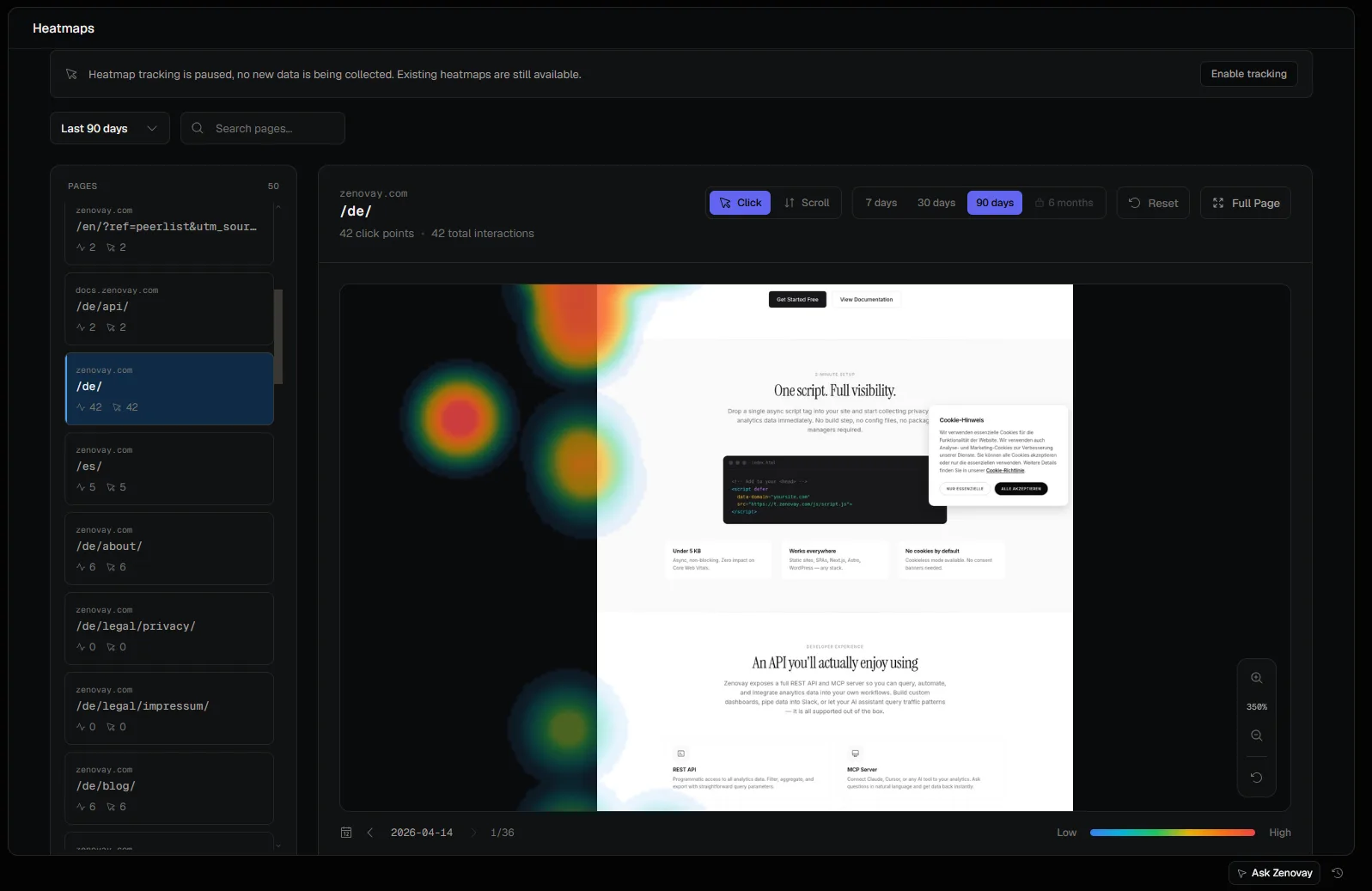
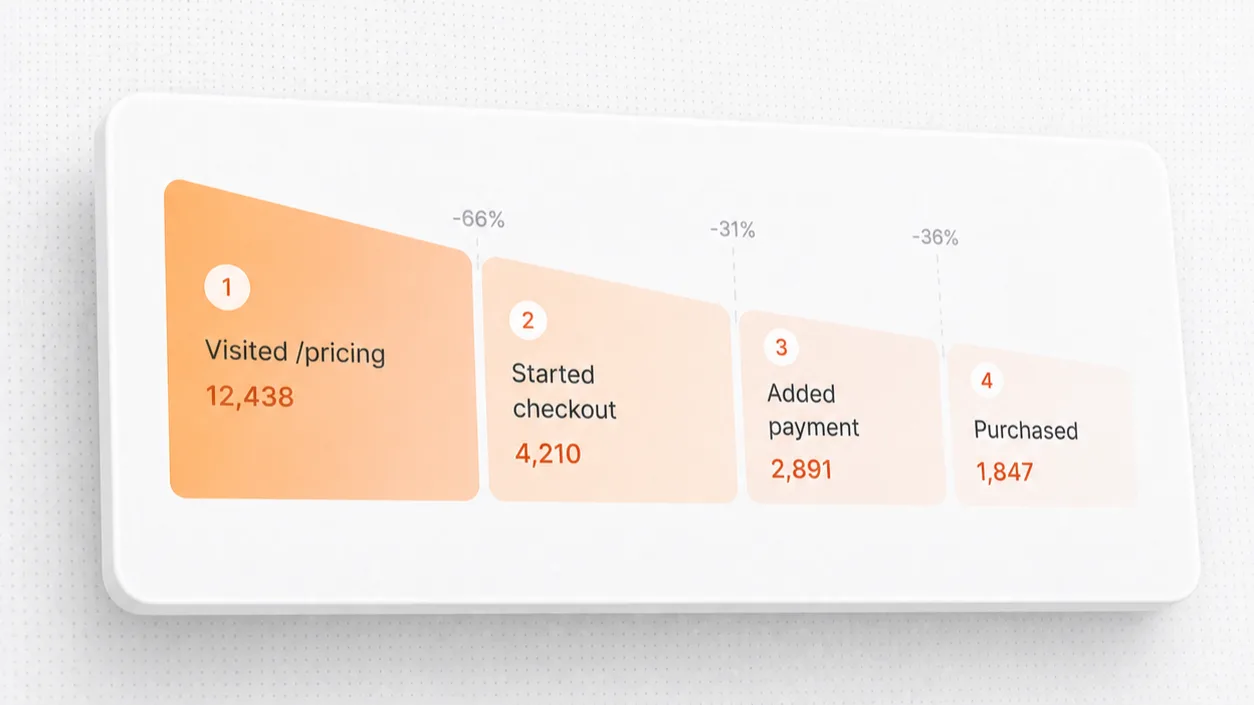
So once your page is live, watch it. A heatmap shows you where people actually look and click, so you can tell whether that first screen is pulling its weight or whether your main button is being quietly ignored. If you have never read one, start with how to read a heatmap. And mapping the path from landing to sign-up as a conversion funnel shows you the single step where most people leave, which is almost always where the fastest win is hiding.
When you can see the funnel, the priority picks itself. The biggest drop is rarely where you guessed it would be. Fix that one step first, ship the change, and watch whether the drop shrinks. That loop, see, change, see again, is what turns a decent page into one that keeps getting better.
Common landing page mistakes to avoid
Most landing pages fail in the same handful of ways. If you audit for nothing else, audit for these, because fixing them puts you ahead of most pages on the internet:
- Too many goals: a page that asks for a sign-up, a demo, a newsletter, and a follow converts well for none of them. One page, one job.
- Feature dumping: listing everything you built instead of what changes for the visitor.
- A buried or hedged CTA: if people have to look for the button, you have already lost some of them.
- Generic proof: star walls and vague badges that a careful reader discounts immediately.
- A slow first screen: if the page takes too long to load, visitors leave before the first word ever lands. Speed is part of conversion.
- Shipping and forgetting: going live with no way to see what visitors actually do, so the page never gets better.
Ship it, then keep making it better
None of this requires a from-scratch redesign. You do not need a bigger team or a new framework. You need one focused page, an honest look at what visitors do on it, and the willingness to change one thing at a time and check the result.
So pick the single highest-leverage fix from this guide, the weak headline, the buried button, the five-field form, ship it this week, and look at whether it moved. A landing page is never really finished. It is just better than it was last month, because you kept watching it.
Frequently Asked Questions
What is a good landing page conversion rate?
It depends so heavily on your industry, traffic source, and offer that any single benchmark is close to useless. A cold ad audience and warm word-of-mouth traffic will never convert at the same rate. Rather than chasing someone else's number, measure your own conversion rate and focus on beating last month. The only trend that matters is yours going up.
How do I test a landing page?
Start by watching real behavior, not by guessing. Use a heatmap to see where attention and clicks go, and a funnel to find the step where people drop. That tells you what to change. Then change one thing, form a clear hypothesis about why it will help, and compare. Full A/B testing is great once you have enough traffic for the result to be trustworthy; before that, qualitative signals like heatmaps and session recordings will teach you more, faster.
What is a heatmap and how does it help a landing page?
A heatmap is a visual summary of where visitors look, scroll, and click on a page, with the busiest areas shown hot and the ignored areas cold. On a landing page it instantly reveals whether people reach your call to action, which sections they skip, and where they click on things that are not actually links. For the full version, see how to read a heatmap.
How many calls to action should a landing page have?
One primary action, repeated as often as it naturally fits. Showing the same CTA several times as the visitor scrolls is good. What hurts is several different actions competing for the same click. Pick the one thing you most want a visitor to do, make it the obvious choice everywhere, and let any secondary links stay clearly secondary.